Drop Down MenusCSS Drop Down MenuPure CSS Dropdown Menu

Dearness allowance hike orders issued

           The rates of Dearness Allowance payable to the State Government Employees, Teachers, Staff of Aided Schools, Private Colleges and Polytechnics, Full time Employees borne on the contingent and work charged establishments and employees of Local Bodies will be revised w.e.f. 01.07.2017 in the revised scale as shown below:

Date from which payable Percentage increase of D.AConsequent Revised D.A.
01-07-2017 1 %15 %
Arrear amount with effect from 01-07-2017 will be paid in cash.

DOWNLOAD ORDER FOR MORE DETAILS

Download

GPF Credit card or Annual account statements 2017

  The Office of the Principal Accountant General (A&E), Kerala Thiruvananthapuram have commenced uploading the Annual Account Statements (Credit cards) for the year 2016-17 of GPF subscribers of Kerala on Departmental basis. The work is expected to be completed very soon       

For downloading the latest GPF credit cards 


please click the Download link below or visit GPF Credit card tab 

GPF Pin finder and GPF Calculator also available in this blog

NB: Members of this blog may comment their GPF Number and E-mail ID as a comment or message through 'Contact us'  tab for getting the statement (upto 24 hours delay)


Tags: GPF Kerala, GPF Statement, GPF Statement Kerala 2015-16, GPF Statement Kerala 2016-17, GPF Credit Card, GPF credit card Kerala, 2017

How to trace government receipts in treasury (UTR search)


Bills and other treasury payments to various nationalized banks are done through e-kuber in treasury department. We can download  the Acknowledgment receipt in PDF format if know the UTR number.

We can trace out the following details


Bill Reference Number (BRN), Name of Treasury, Name of Department, DDO Code , Designation of DDO , Name of Office

TREASURY PASSING DETAILS :  Counter Date , Treasury Reference No. (TRN), Accounting Date.
DETAILS OF PAYMENT : Credit To : Bank Account Name of Beneficiary ,  IFS Code,  Account Number, Amount, Purpose of payment,  RBI Ref. No,UTR Number, Credit Status,  Credit Date etc

STEPS
2. Click UTR Search 
3. Enter UTR number in the space provided (U+ digits) and click search
4. Click Download Acknowledgement Receipt 


Single Window Admission Schedule 2018


Single Window Admission Schedule 2018
Kerala HSE/Plus one Admission/Ekajalam
ഏകജാലകം 

The Single Window Admission schedule for the academic year 2018-19 and updates will be made available here, as and when it is published. 
Single Window Admission Schedule 2018
ADMISSION PROCEDUREDATE
Commencement of online submission of Applications09-05-2018
Closing of Online Submission of Application18-05-2018
Publication of Trial Allotment25-05-2018
Publication of First Allotment01-06-2018
Publication of Second Allotment11-06-2018
Commencement of Classes13-06-2018

Higher Secondary Plus One Admission Single Window Prospectus 2018-19(Available now)

SSLC RESULTS 2018 Announced

               The office of the commissioner of government examinations of Kerala, under the education department of Kerala Government will announce the results of Kerala Secondary School Leaving Certificate (SSLC) - class 10 - examinations by May 3. It was announced on May 5th last year.

The results will be available in this blog soon after the official announcement. Expecting at 10.30 am on 03/05/2018.

 The results of the Kerala Secondary School Leaving Certificate (SSLC) examinations, SSLC private examination 2018 and THSLC examination are likely to be declared tomorrow (03-05-2017).

Candidates can check the results from the official website

Steps to check the results:
  • Go to the official website keralaresults.nic.in
  • Click on the link, 'Kerala SSLC Class 10 Results 2018'
  • Enter your roll number
  • After submitting the same, the results will be displayed on the screen
  • Take a printout for future use
  • Candidates can check the results on the other websites also:


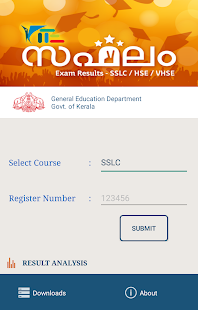
ANDROID APP FOR SSLC RESULT 2018

  • Official mobile application for inquiring SSLC results 2018. The application is powered by KITE (Kerala Infrastructure and Technology for Education).
  • You will get School wise, District wise & DEO wise results in the Result Analysis Link. 
  • You can save a result as PDF file. You can share the result in various social apps


We wish all students the best of luck for their results.

Procedure for Creating ETSB account in SPARK

                Salaries for the government employees are being credited through the eTSB accounts in the coming months. Government offered a high interest too in this type of accounts. There may be auto withdrawal facility of a fixed sum to any accounts (TSB of Bank account) in this account. All utility payments (Electricity, water etc) can be made through this.

 The steps for the creation of eTSB account
1. Create PEN (if Not Available) in SPARK.
2. Update the Present Salary Details in SPARK with TSB/Bank Account No.
3. After confirming the Present Salary Details , a new Button will appear Get eTSB from Treasury

Avoidance of Rushing of Bills towards the close of Financial Year Steps

                Government  have issued instructions to avoid rushing of bills,drawing of advance and transfer credit to special Treasury Savings Bank Accounts towards  the close of financial year.

For details view 

                All Heads of Departments and Drawing and Disbursing Officers have to present bills, cheques, challans etc. to the treasuries latest by 5 P.M. on 28-03-2018.  Any bill submitted after thee above time limit will not be accepted.

                The bills under Plan head of accounts of Government Departments/ Autonomous Bodies , bills of local Self Government Institutions and cheques for drawing from Special TSB Accounts submitted at treasuries after 24/03/2018 will be shifted to treasury Queue.